
Passkeys are becoming a mainstream sign-in option
For years, passwords have been treated as an unavoidable part of running a website. Customers forget them. Members reset them. Students abandon login screens. Store owners deal with support tickets. And every reused or phished password creates another security risk. That is starting to change.
In 2026, passkeys are no longer an early-adopter feature. FIDO’s current reporting describes passkeys as a mainstream authentication option used at global scale, while major platforms continue moving users toward passwordless sign-in rather than treating passwords as the preferred default. [8]
Passkeys let people sign in using the same method they already use to unlock their phone or computer: Face ID, Touch ID, Windows Hello, a device PIN, or a supported security key. They are designed around FIDO standards and use cryptographic credentials tied to a specific website or app, rather than a reusable password that can be typed into the wrong place.
Important clarification
Your website does not receive or store a user’s fingerprint or face scan. The device uses its own screen lock to approve the sign-in, while the website receives cryptographic proof that the user has the correct Passkey.
This is no longer a niche experiment limited to technology companies. Major consumer services, marketplaces, payment platforms, and online brands have deployed passkeys, while FIDO’s Passkey Index tracks adoption data from participating organisations.[1]
Passkeys are not supposed to force users into a strange new login process. In many cases, they replace the most annoying part of the existing experience: typing, remembering, resetting, and protecting passwords. Instead of entering a password, the visitor confirms their identity through their device. That might mean Face ID on an iPhone, Touch ID on a MacBook, Windows Hello on a Windows computer, or a device PIN on Android.
The security benefit matters, but the usability benefit is just as important. A password can be forgotten, reused, guessed, leaked, phished, or typed into a fake login page. A passkey is tied to the real website or app it was created for, which makes phishing attacks much harder to pull off because the credential is not designed to be copied and entered on an unrelated domain.
FIDO reported in late 2024 that more than 15 billion online accounts could use passkeys, more than double the previous year. The same report said Amazon had made passkeys available to all of its users and had already seen 175 million passkeys created for Amazon sign-in across regions.[2]
That does not mean passwords disappear overnight. It means website owners should stop treating passwords as the only serious authentication option.
Why ecommerce companies care about Passkeys
Ecommerce businesses care about anything that gets between a customer and a purchase. A returning shopper may have an account but not remember their password. They may use a different email address than last time. They may attempt a reset, get distracted, fail to receive the email, or abandon checkout completely. That is not just a security problem — it is a conversion problem.
Passkeys reduce the steps needed to get back into an account. Instead of remembering and typing a password, the customer confirms on their device. That can make the return-login experience feel closer to unlocking a phone than dealing with an old-fashioned account system.
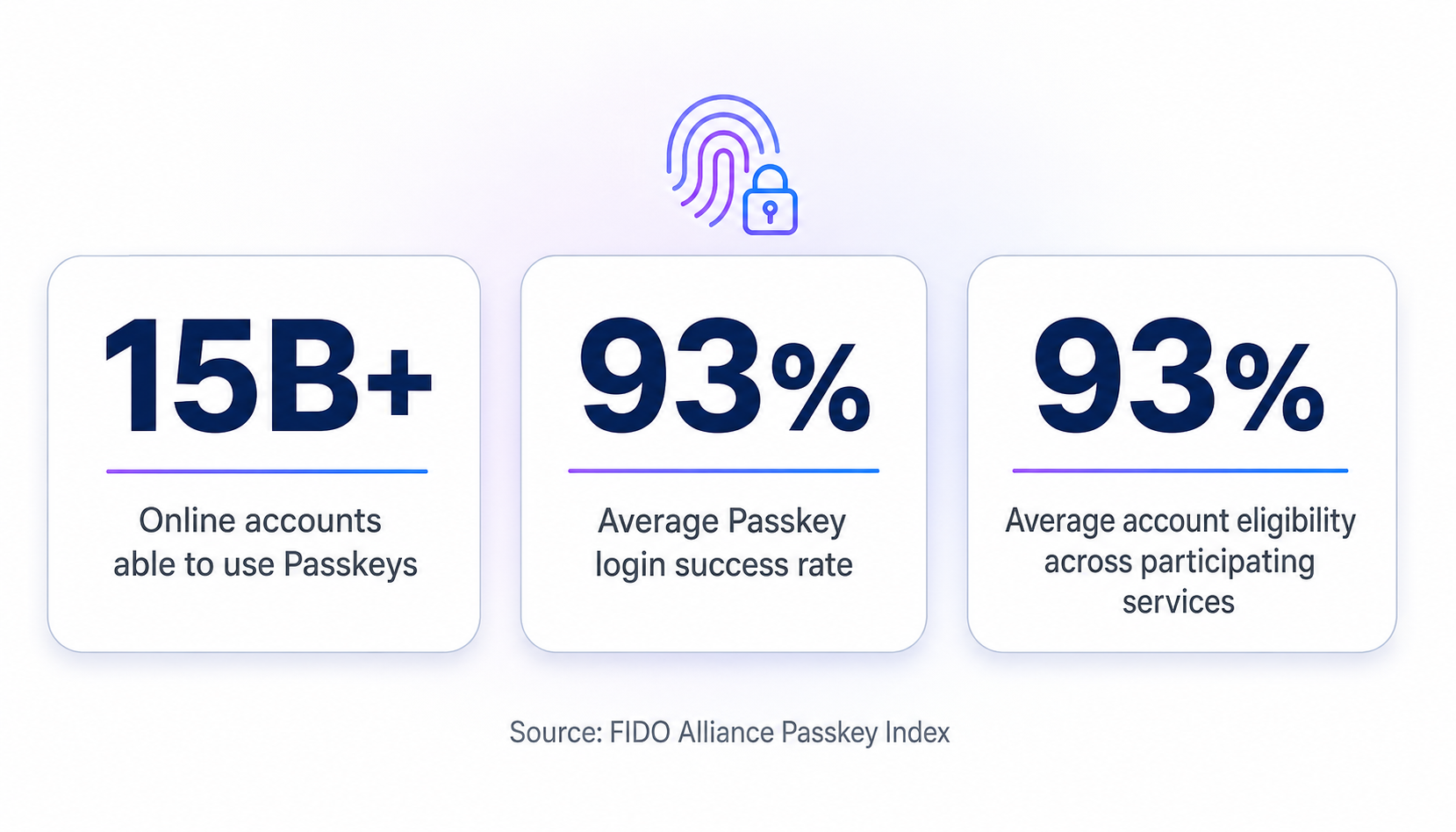
FIDO Passkey Index data from participating services: strong login success, high account eligibility, and continued mainstream adoption.
FIDO’s Passkey Index reports that participating services saw an average passkey login success rate of 93%, compared with 63% for other authentication methods in the study. The report also says those organisations found passkeys eligible for an average of 93% of user accounts.[3] These figures are aggregated from participating organisations, so they should not be treated as a universal conversion promise for every website. They are still a strong indication that passkeys are performing well at scale.
Mercari provides a useful ecommerce example. In its FIDO case study, Mercari reported that passkey sign-in was 3.9 times faster than SMS OTP sign-in: 4.4 seconds on average for passkeys versus 17 seconds for SMS one-time codes.[4] It also reported a higher success rate for passkeys than SMS OTP.
That matters for WordPress stores because login friction often appears in the worst possible place: during checkout, when customers return to view orders, when users try to manage subscriptions, when members need access to paid content, and when learners need to get back into a course. A site does not need millions of users for this to matter — a small percentage of failed or abandoned logins can create real support overhead and lost revenue.
The shift is not only about ecommerce
Passkeys are relevant anywhere users return repeatedly. That includes:
- WooCommerce stores
- Membership websites
- Online course platforms
- Community sites
- Customer portals
- Subscription businesses
- Event or booking platforms
- Agency-built client portals
- SaaS-style WordPress tools
Membership and LMS sites are especially good candidates because users often return after days or weeks away — exactly when passwords become a problem. A learner who cannot remember a password may not bother starting the course. A member who struggles to sign in may open a support ticket. A customer who cannot access their account may assume something is broken.
Passkeys do not solve every login problem. But they remove one of the biggest recurring ones: asking people to remember a secret they rarely use.
What major platforms are signalling
The most important thing major companies are signalling is not that passwords are gone. They are signalling that a better default is possible.
Google describes passkeys as an easier and more secure alternative to passwords, allowing people to sign in with a fingerprint, face scan, or screen lock.[5]
Microsoft has reported that users signing in with passkeys were more successful than users completing password-based flows, while passkey sign-ins were significantly faster than password-plus-MFA flows. Microsoft also said its passwordless-preferred experience had reduced password use.[6]
Amazon has publicly shared passkey adoption data through FIDO-related coverage, including figures showing broad customer adoption and faster authentication than traditional passwords.[7]
Large consumer platforms are not investing in passkeys because they are fashionable. They are investing because login success, fraud resistance, and user experience directly affect their business.
What this means for WordPress
WordPress sites should learn from that direction of travel. The lesson from Google, Microsoft, and Amazon is not to remove passwords overnight — it is that offering a faster, more reliable sign-in default alongside existing methods is worth doing.
Why WordPress sites should not remove passwords overnight
This is where many passwordless articles get unrealistic. Passkeys are not a reason to hide every password field tomorrow.
Some users will still need fallback methods. Some older devices or browsers may not support the experience well enough. Some users will change devices. Some customers may prefer email-based sign-in. Site administrators may need a recovery path if something goes wrong.
Do not do this
Do not delete passwords or hide login fallbacks the moment Passkeys are enabled. Removing every other sign-in route before users have adopted Passkeys risks lockouts, abandoned accounts, and avoidable support tickets.
The practical rollout is not “delete passwords.” It is:
- Offer Passkeys.
- Keep a familiar fallback.
- Let users adopt the easier method gradually.
- Watch which methods people actually use.
- Reduce password dependence only where your site is ready.
That means a good WordPress login system should support more than one route, for example:
- Passkeys for fast, secure return sign-in
- Social Login for users who prefer Google, Facebook, Microsoft, or another connected account
- Magic Link for people who prefer a secure email sign-in link
- Email OTP for users who want a code sent to their inbox
- Password fallback where your site still needs it
The goal is not to force everyone into a single “passwordless” method. The goal is to give users a faster route into their account while keeping sensible recovery options.
The practical WordPress login stack in 2026
For most WordPress sites, the strongest setup is not one login method — it is a layered login system.
1. Make Passkeys available for returning users
Passkeys are best for people who already have an account and return regularly. They work particularly well for WooCommerce customers, members, learners, subscribers, community users, and staff or client-portal users. A user who signs in with Face ID or Windows Hello is less likely to hit the “Lost your password?” loop.
2. Keep Social Login for low-friction account creation
Social Login remains useful because many visitors already trust sign-in through Google, Microsoft, Facebook, Discord, or other providers. It can reduce registration friction, especially for public-facing communities, ecommerce stores, events, and course platforms. But Social Login should not be your only modern login method — not everyone wants to connect a social provider, and some users will return on a device where they would rather use a Passkey or email-based sign-in.
3. Use Magic Link for email-first users
Magic Link is useful when a user wants a passwordless route but is not ready to create a Passkey. They enter their email address, receive a single-use link, and sign in without typing a password. This works well for content sites, simple membership areas, low-friction access flows, and users who already expect to use email to verify their identity.
4. Use Email OTP where a code-based flow feels familiar
Email OTP gives users a code they enter after receiving it by email. Some people prefer this because it is obvious, predictable, and works across devices. It can also be a useful backup when a passkey is unavailable or a Magic Link flow is inconvenient.
The main point is not that one method beats every other method. The point is that your site should stop forcing every user through passwords when better options are available.
Where Passkeys matter most on a WordPress site
WooCommerce
WooCommerce stores should care about Passkeys because customers often return to check order status, manage subscriptions, update payment details, download invoices, reorder products, view account details, or complete checkout while signed out.
A password reset at checkout is friction. A Passkey prompt can be a faster route back into the account. The safest approach is to offer Passkeys alongside existing methods, not replace everything at once.
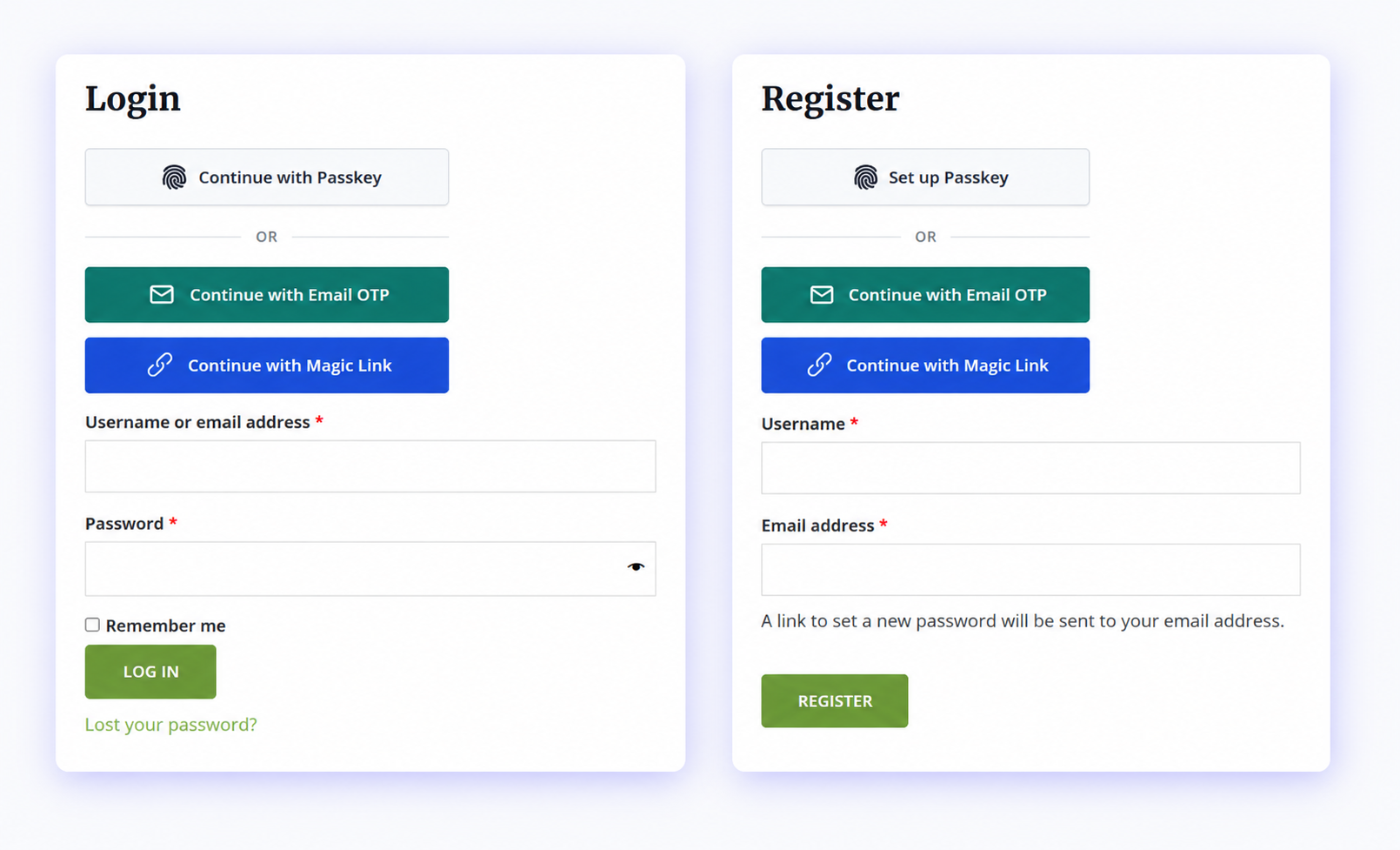
WooCommerce account login with a Passkey option for returning customers.
Membership sites
Membership sites are built on repeat access. Members may return weekly, monthly, or irregularly — exactly when passwords become easy to forget. Passkeys can make access to protected content, account areas, member dashboards, and subscription management far less frustrating.
LMS and course platforms
Learners are rarely excited to deal with login forms. They want to continue a course, complete a lesson, download a resource, or access a certificate. A smoother login experience reduces the chance that a learner gives up before getting back into the course. Passkeys are particularly useful for repeat learners who use the same phone, laptop, or desktop device.
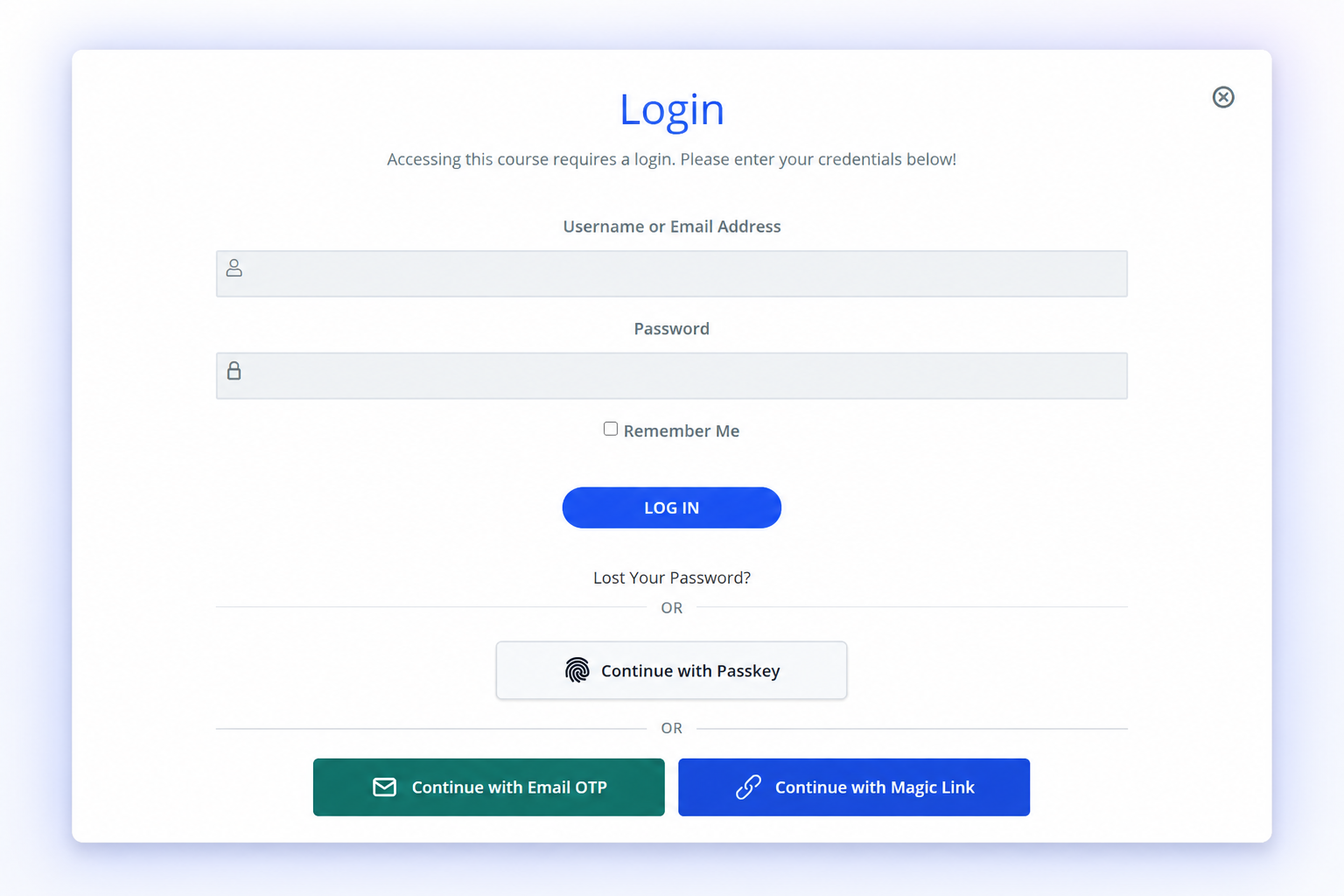
LearnDash login flow with Passkey, Email OTP, and Magic Link options for returning learners.
Community sites
Community users may sign in to comment, reply, post updates, join groups, or manage their profile. The more often a user returns, the more sensible it becomes to offer Passkeys, Social Login, Magic Link, and Email OTP instead of relying on passwords alone.
Start with sites where users return regularly and login failure has a direct cost: WooCommerce stores, membership platforms, online courses, subscriptions, customer portals, and communities with protected accounts.
Choosing the right WordPress login fallback
No single login method is universally best. The table below is a conservative, at-a-glance comparison to help match each method to the right situation.
| Method | Best for | Main advantage | Important limitation |
|---|---|---|---|
| Passkeys | Returning users and supported account-registration flows | Fast, phishing-resistant sign-in using Face ID, Touch ID, Windows Hello, a device PIN, or a security key | Users still need a compatible device or browser, so a fallback option remains important |
| Social Login | Low-friction account creation | Users sign in with a provider they already trust, such as Google or Microsoft | Depends on users having and wanting to use a connected social account |
| Magic Link | Email-first users who are not ready for Passkeys | No password to type; a single-use link handles sign-in | Relies on timely email delivery and access to the inbox |
| Email OTP | Users who prefer a familiar code-based flow | Predictable and works consistently across devices | Adds an extra step of checking email and typing a code |
| Passwords | Sites still transitioning, or as an admin fallback | Universally understood and does not require extra setup | Prone to being forgotten, reused, or phished |
How VentraConnect approaches Passkeys for WordPress
VentraConnect is built around the idea that WordPress sites should be able to offer modern sign-in methods without being forced into a separate hosted identity platform. Passkeys are not treated as a separate gimmick — they sit alongside Social Login, Magic Link, and Email OTP as part of one WordPress authentication system. That gives site owners room to roll out passwordless login gradually rather than betting everything on a single method.
Standard WordPress flows
- Native Passkeys for standard WordPress login, registration, profile, and shortcode-based flows
- Social Login
- Magic Link
- Email OTP
- Account-creation controls
- Redirects
Extends into supported integrations
- Supported WooCommerce placements
- Membership and community integrations
- LMS integrations
- Comments integration where supported
- Inline Magic Link and Email OTP forms
- Branded authentication emails
- Analytics and diagnostics
- Passwords Phaseout controls
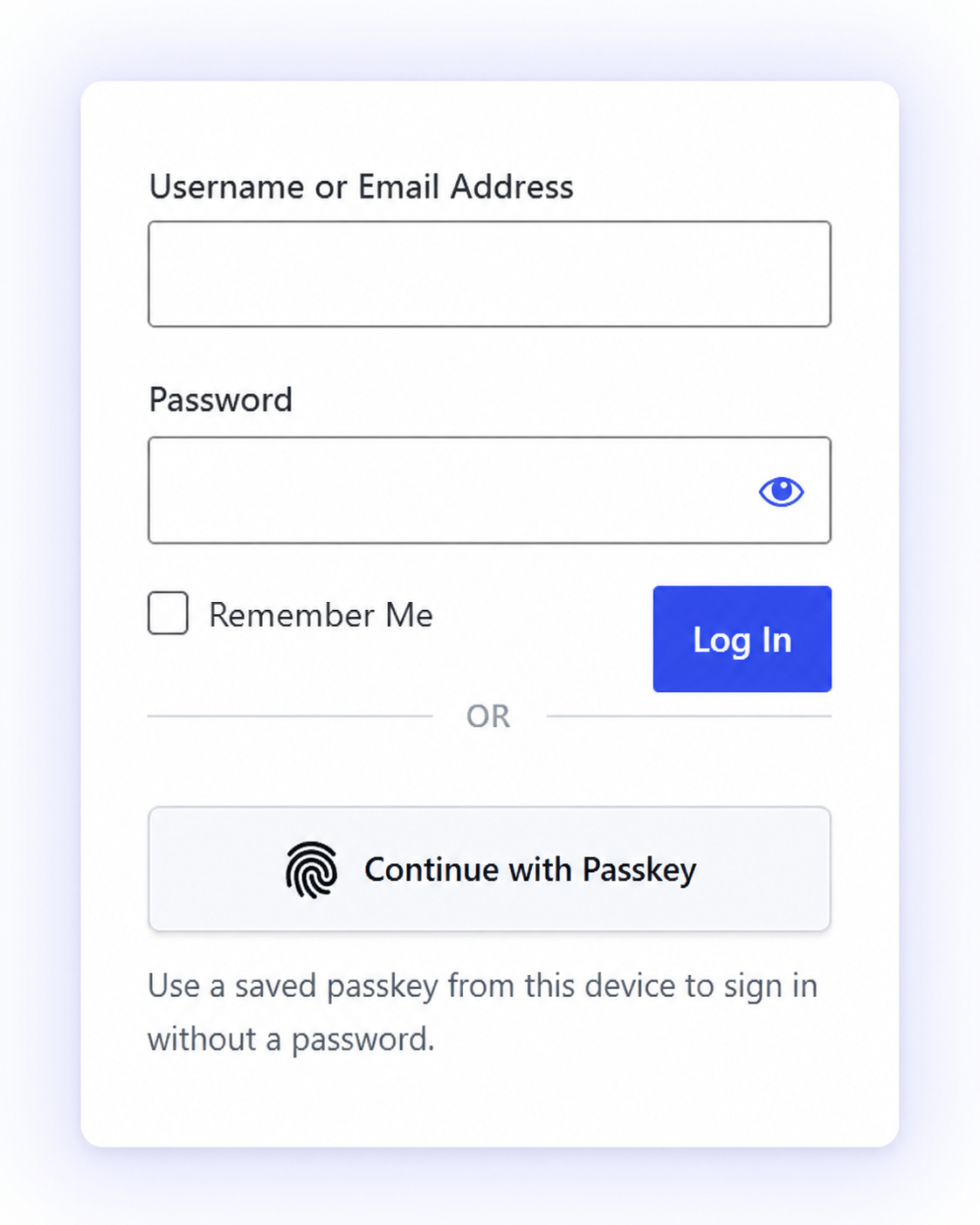
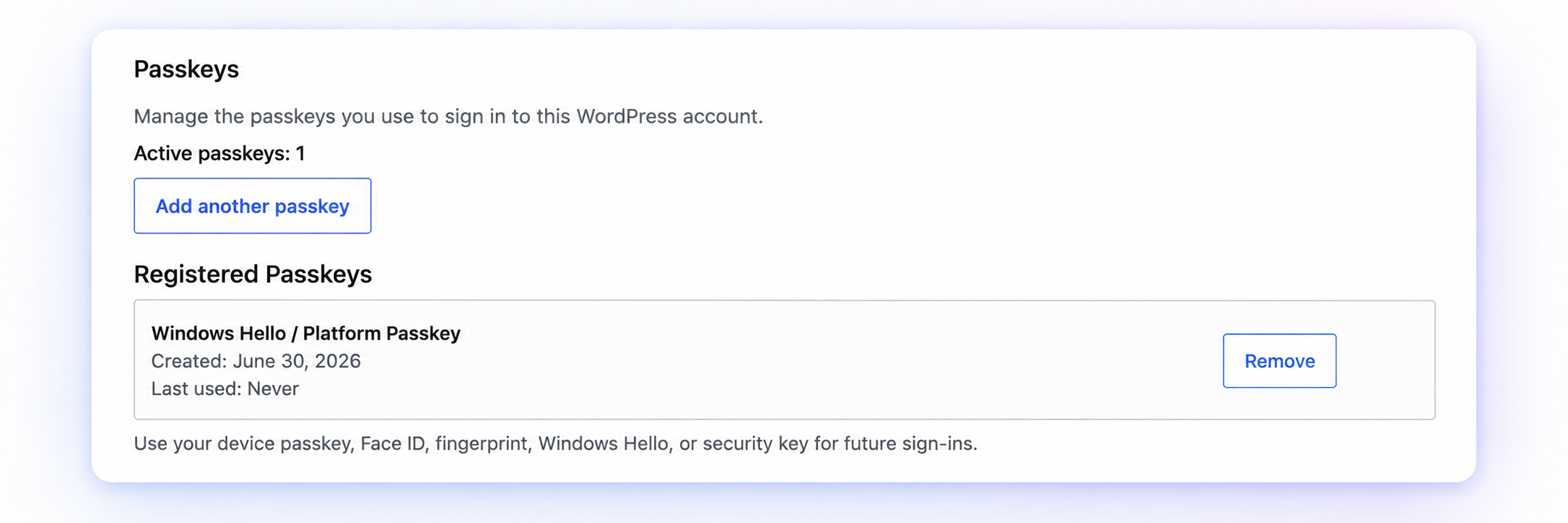
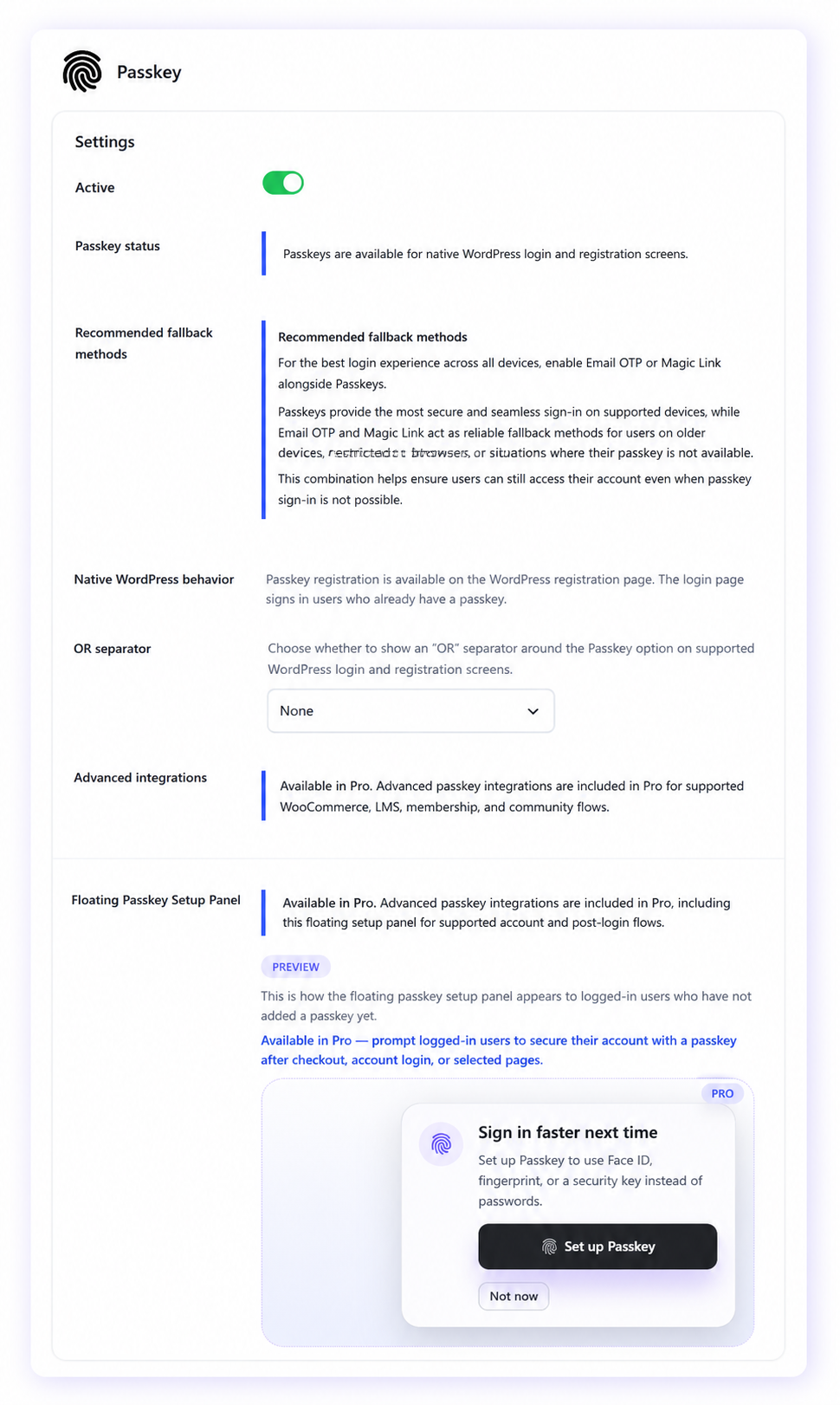
Not every login method appears on every integration surface. Coverage depends on which flows and plugins are supported for each placement.
A sensible rollout plan for WordPress site owners
You do not need a major redesign to start. A practical rollout can look like this:
-
Enable Passkeys on core WordPress flows
Start with standard login, registration, profile, and shortcode-based forms. This lets existing users add a Passkey without disrupting every part of the site immediately.
-
Keep fallback methods available
Keep passwords, Magic Link, Email OTP, or Social Login available while users adopt Passkeys. Do not make your site harder to access in the name of becoming passwordless.
-
Add Passkeys where friction costs most
For ecommerce sites, that may mean WooCommerce login, checkout, and My Account. For membership sites, it may mean login and account pages. For LMS sites, it may mean student login, registration, and course access.
-
Encourage existing users to add a Passkey
This is usually easier than trying to force Passkey setup before users understand the benefit. A simple “Sign in faster next time” prompt after checkout, login, or account activity can be enough.
-
Review usage before phasing out passwords
Only consider reducing password visibility after users have working alternatives. Your site should have clear fallback routes and a recovery plan before you block password login for regular users.
The real opportunity in 2026
Passkeys are not magic. They will not fix bad account flows, unclear registration rules, broken redirects, poor email delivery, or unreliable checkout design. But they solve a real and expensive problem: passwords are a weak point in both security and user experience.
Major consumer services are already showing that users will adopt passkeys when the experience is simple. FIDO’s data indicates that services offering passkeys are seeing strong eligibility, usage, and successful sign-in performance.
For WordPress site owners, the opportunity is not to make a dramatic “passwordless only” announcement. It is to make signing in easier: offer Passkeys, keep practical fallbacks, use the methods that match your audience, then phase passwords down only when your site is ready.
That is the realistic path to a more secure, lower-friction WordPress login experience.
Sources and further reading
- FIDO Alliance – Passkey Index 2025. Read source
- FIDO Alliance – Passkey Adoption Doubles in 2024: More than 15 Billion Online Accounts Can Leverage Passkeys. Read source
- FIDO Alliance – Passkey Index – October 2025 (PDF). Read source
- FIDO Alliance – Mercari’s Passkey Authentication Speeds Up Sign-in 3.9 Times. Read source
- Google – Create a Passkey to Log Into Your Google Account. Read source
- Microsoft Security Blog – Pushing Passkeys Forward: Microsoft’s Latest Updates for Simpler, Safer Sign-ins. Read source
- FIDO Alliance – Amazon Shares Data on Their Customer Passkey Adoption. Read source
- FIDO Alliance – The State of Passkeys 2026: Global Consumer and Workforce Report. Read source