
PASSWORDLESS LOGIN FOR WORDPRESS
Passwordless Login for WordPress with Magic Link & Email OTP
VentraConnect adds Magic Link and Email OTP login to WordPress, so users can access their account with a secure email link or one-time code.
Keep standard password login available, add optional Social Login, and control how passwordless login behaves from one plugin.
Magic Link • Email OTP • Password fallback • Optional Social Login • Inline Pro forms
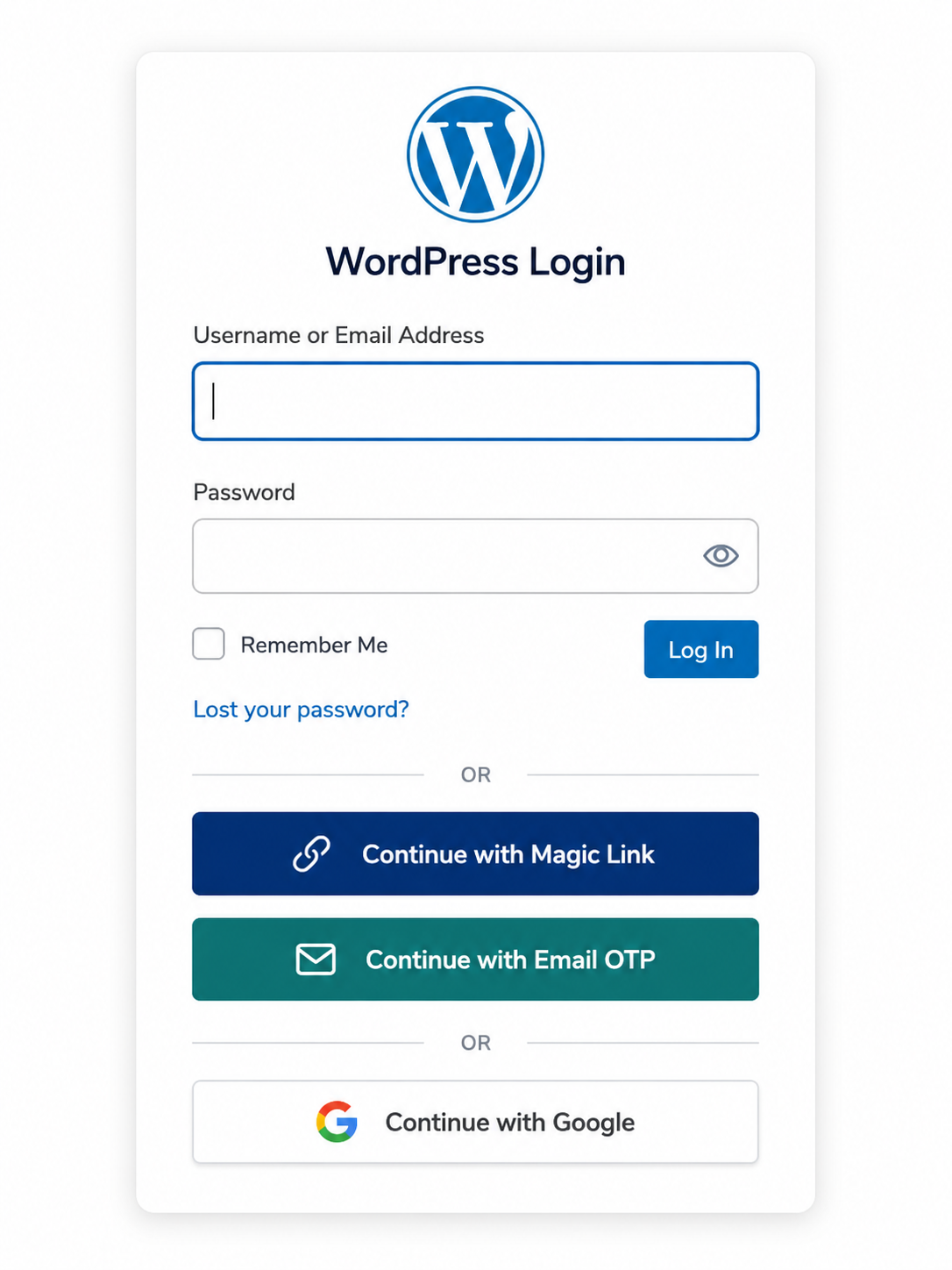
The problem
WordPress passwords create unnecessary login friction
Password login still works, but it is often the slowest way for returning users to access a WordPress site.
Users forget passwords, reset emails get delayed, inboxes become a second login screen, and people abandon the flow before they reach the page, course, order, membership area, or account dashboard they came for.
Forgotten passwords
Users forget passwords and get stuck in reset loops instead of accessing their account.
Reset email delays
Password reset flows add extra steps: inbox checks, spam folders, new passwords, and return visits.
Returning-user friction
Members, students, customers and clients should not have to fight the login form every time they come back.
A good WordPress passwordless login plugin should reduce friction without removing control. VentraConnect gives users easier sign-in options while keeping standard login, redirects, registration rules and account controls available.
The solution
Give users passwordless ways to sign in
VentraConnect gives your WordPress site multiple login methods in one plugin. Instead of relying only on the default WordPress password form, you can let users choose how they sign in.
Magic Link Login
Users enter their email address and receive a secure sign-in link. They click the link and log in without typing a password.
Useful for users who forgot their password but still have access to their inbox.
Email OTP Login
Users receive a one-time code by email and enter that code to sign in without using a password.
Useful for users who prefer a short code instead of clicking a login link.
Standard Password Login
VentraConnect does not force you to remove the normal WordPress password login form.
Keep password login available as a familiar fallback while adding passwordless options.
Optional Social Login
VentraConnect also includes Social Login, so users can sign in with supported providers like Google, Facebook, LinkedIn, Microsoft and more when social login fits your site.
One plugin, multiple sign-in paths
Users can choose Magic Link, Email OTP, Social Login, or the standard password form. VentraConnect handles the selected method and applies your account rules behind the scenes.Choose method
Magic Link, Email OTP, Social Login or password login.Receive access
Users get a secure link or one-time code by email.Sign in faster
VentraConnect logs them in and applies your redirect settings.FRONTEND EXPERIENCE
Clear passwordless login flows for users
Passwordless login should not feel confusing. VentraConnect gives users clear feedback after they request a Magic Link or Email OTP, including confirmation messages, expiry timers, resend options and the next step needed to complete login.
Magic Link modal flow
After requesting a Magic Link, users see a clear inbox confirmation, link expiry timer and resend option. This helps users understand that the link was sent and how long it remains active.
- Inbox confirmation
- Expiry countdown
- Resend link option
- Email address field
Email OTP modal flow
After requesting an Email OTP, users can enter the verification code in the same flow, see how long the code remains valid, resend the code if needed, and continue login without using a password.
- Verification code field
- Code expiry countdown
- Resend code option
- Verify and continue
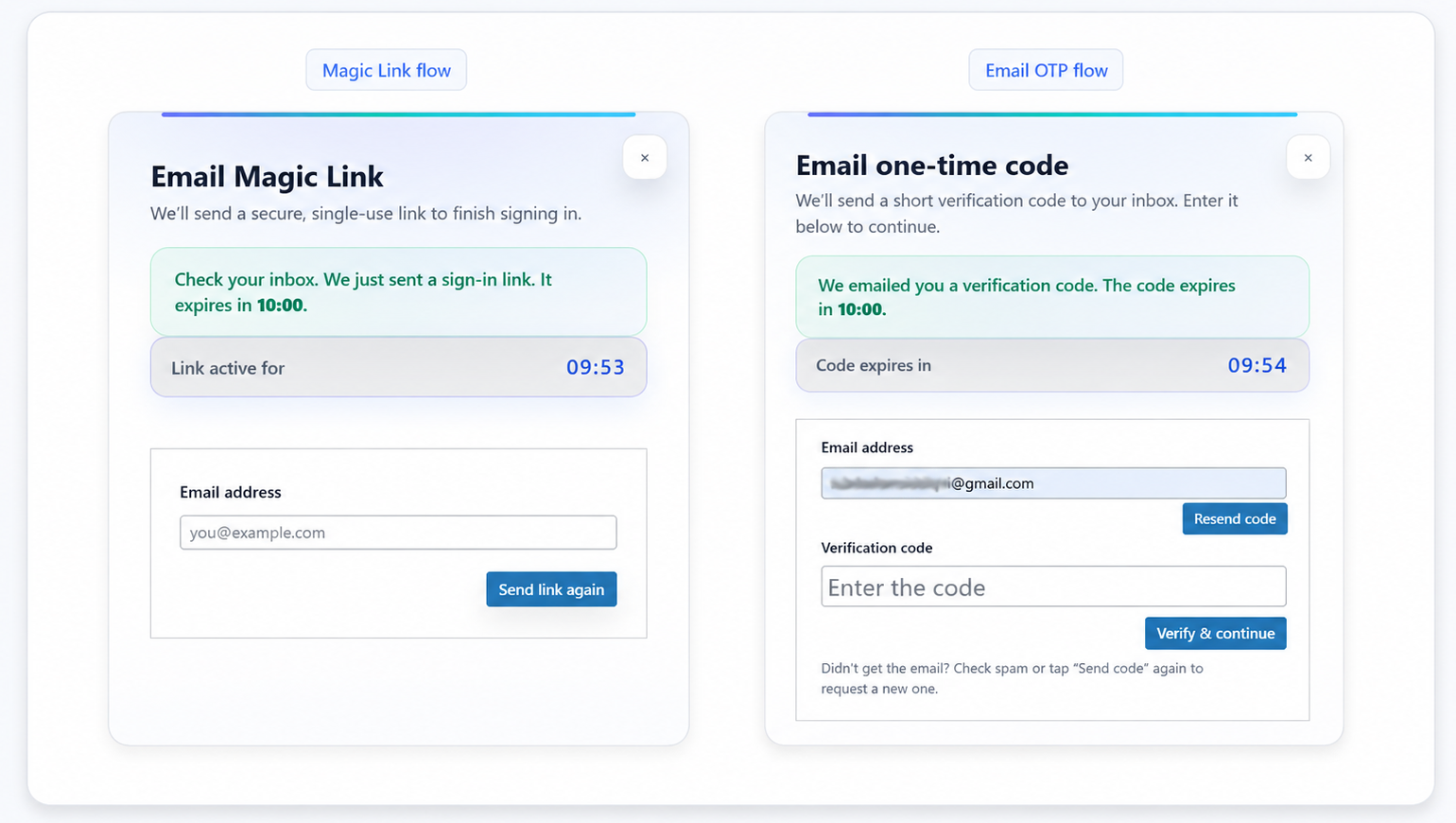
Both flows use your existing VentraConnect passwordless settings, including expiry, resend behavior, registration mode, redirects and account rules.
PRO INLINE FORMS
Add inline Magic Link and Email OTP forms to custom layouts
VentraConnect Pro includes inline passwordless login forms that can be embedded directly inside pages, Elementor popups, account dropdowns and custom login layouts.
The main VentraConnect shortcode can already display Magic Link and Email OTP as login method buttons that open the normal passwordless modal flow. Pro inline forms are different: they place the actual Magic Link or Email OTP form directly wherever you add the shortcode.
This is useful when you want users to request a Magic Link or enter an Email OTP directly inside the page, popup or dropdown, without first clicking a “Continue with Magic Link” or “Continue with Email OTP” button.
Inline Magic Link form
Use the Magic Link inline form when you want users to enter their email address and receive a secure sign-in link from the page, popup or layout where the shortcode is placed.
[ventraconnect_magic_link_form]
- Email address field
- Send Magic Link button
- Inline success and error messages
- Existing redirect settings
Inline Email OTP form
Use the Email OTP inline form when you want users to enter their email, receive a code, enter the verification code, and log in from the same embedded form.
[ventraconnect_email_otp_form]
- Email address field
- Send Code button
- Verification code field
- Verify & Login button
- Inline success and error messages
Redirects stay consistent
Inline passwordless shortcodes do not use a redirect attribute. Redirect behavior is handled by your existing VentraConnect Magic Link and Email OTP redirect settings, so inline forms stay consistent with the normal passwordless flow.
PASSWORDLESS CONTROLS
Configure Magic Link and Email OTP without custom code
VentraConnect does not just add two passwordless buttons to WordPress. Magic Link and Email OTP each have their own settings, so you can control how each method behaves.
Manage expiry, resend throttling, registration mode, redirects, email content and button styling from the WordPress admin.
Magic Link settings
Control how Magic Link login works, including link expiry, single-use behavior, optional same-IP restriction, resend throttling, registration mode and redirects.
- Link expiry
- Single-use links
- Same-IP restriction
- Resend throttle
- Login only / Login & Register
- Redirect override
- Email content
- Button preview
Email OTP settings
Control how Email OTP login works, including code length, expiry time, resend throttling, maximum verification attempts, registration mode and redirects.
- Code length
- Code expiry
- Resend throttle
- Max attempts
- Login only / Login & Register
- Redirect override
- Email content
- Button preview
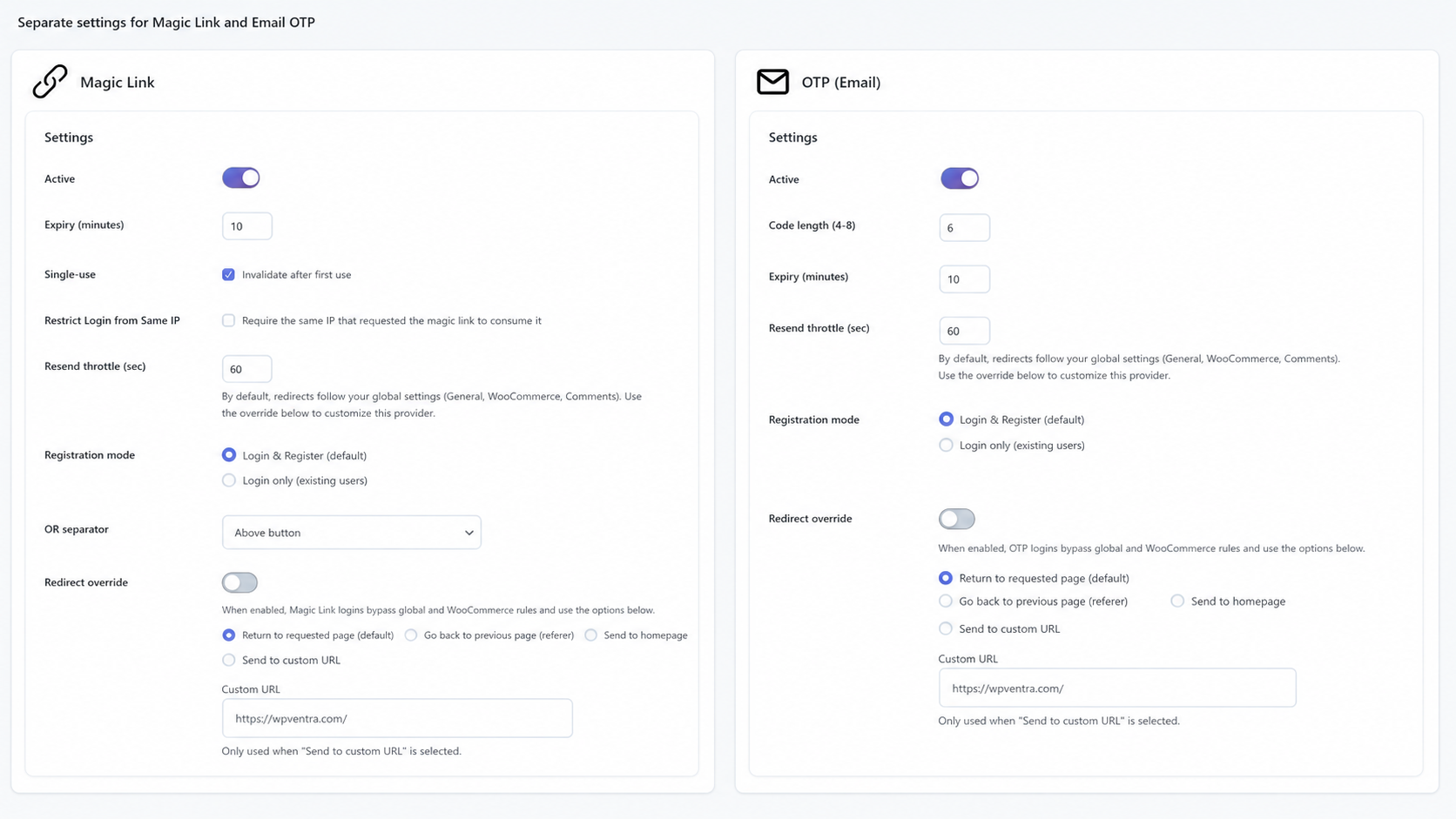
Magic Link and Email OTP can be configured separately, so each method can use its own expiry, resend, registration and redirect behavior.
PASSWORDLESS EMAILS
Polished Magic Link and OTP emails out of the box
Passwordless login depends on email. If the email looks unclear or untrusted, users hesitate. VentraConnect includes polished default HTML emails for both Magic Link and Email OTP, helping users recognize the message, trust the login request, and complete sign-in faster.
Magic Link email
Magic Link emails include a clear sign-in button, fallback raw link, expiry note and “ignore if not requested” message. This helps users complete login even if their email client blocks buttons.
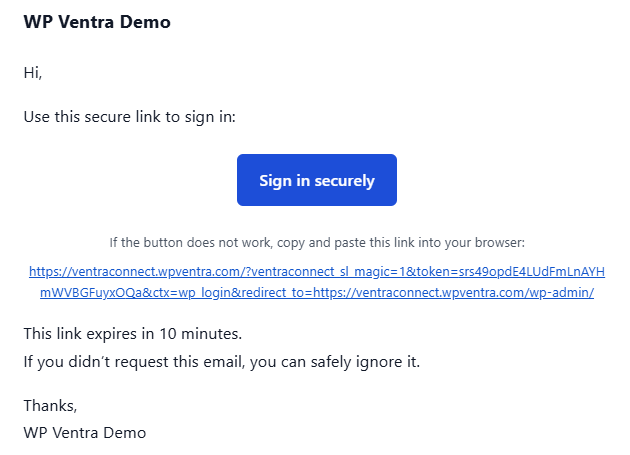
Magic Link email preview
Email OTP email
OTP emails display the one-time login code in a large readable format, with expiry information and clear context so users know exactly what to enter.
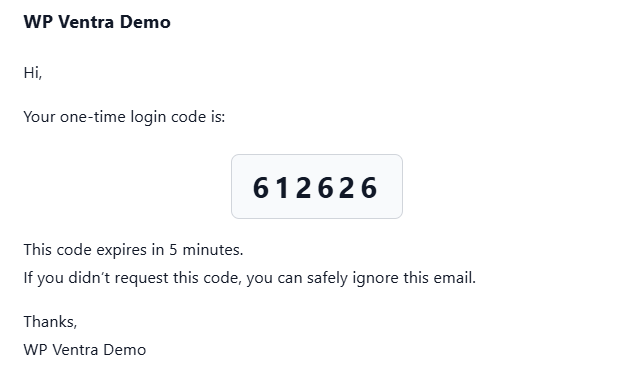
Email OTP email preview
PRO EMAIL BRANDING
Brand Magic Link and OTP emails in Pro
VentraConnect includes polished default passwordless emails in the free plugin.
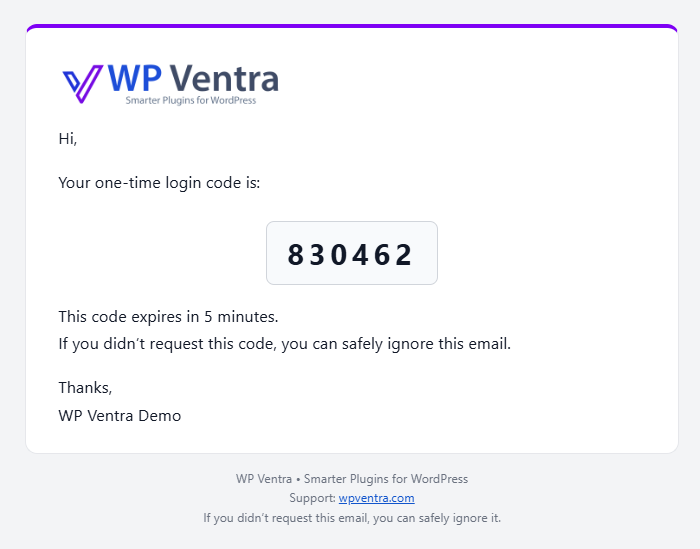
VentraConnect Pro adds passwordless email branding controls, so you can customize the shared Magic Link and OTP email wrapper with your logo, accent color and footer text.
Add your logo
Display your site or client logo inside Magic Link and OTP emails.
Choose an accent color
Match the email wrapper accent to your site, brand or client project.
Customize footer text
Add support, legal, security or brand guidance below the email content.
ACCOUNT CREATION CONTROL
Passwordless login with Guardrails
Adding easier login methods is useful, but WordPress site owners still need control over when supported login methods can create new accounts.
VentraConnect Guardrails help you control whether supported login methods can create new accounts from specific login flows, or only sign in existing users.
That means you can offer Magic Link and Email OTP while keeping account creation behavior controlled by your VentraConnect settings.
Control when passwordless login can create accounts
Use different rules for Magic Link and Email OTP depending on how you want users to access your site.
PASSWORDLESS MODE
Choose how strongly your site moves away from passwords
VentraConnect also includes Passwordless Mode controls for sites that want to reduce or phase out password-based login.
You can keep passwords fully available, use a recommended passwordless setup where normal users are guided toward Social Login, Magic Link or Email OTP, or use a stricter passwordless setup on supported flows.
Off
Password login stays fully available while Magic Link, Email OTP and Social Login appear as additional login options.
Recommended
Passwordless is primary for normal users, while site administrators keep password access as a fallback.
Strict
Supported login flows move fully toward passwordless access, with emergency access guidance for site owners.
FREE VS PRO
Choose the right passwordless login setup
Start with the free plugin for standard WordPress login, registration and shortcode-based login pages.
Upgrade to VentraConnect Pro when you need inline passwordless forms, branded passwordless emails, WooCommerce checkout, My Account, membership, LMS or other deeper account flows.
Use Free if
You want Magic Link, Email OTP, Social Login, Guardrails and redirects on standard WordPress login, registration or shortcode-based login pages.
Install Free PluginUse Pro if
You want inline Magic Link and Email OTP forms, branded passwordless emails, WooCommerce checkout, WooCommerce My Account, membership, LMS or other deeper account flows.
View Pro Features| Feature | Free | Pro |
|---|---|---|
| Magic Link login for WordPress | ✓ | ✓ |
| Email OTP login for WordPress | ✓ | ✓ |
| Social Login with supported providers | ✓ | ✓ |
| Standard password login stays available | ✓ | ✓ |
| Default WordPress login page | ✓ | ✓ |
| WordPress registration page | ✓ | ✓ |
| Magic Link/OTP buttons via main shortcode | ✓ | ✓ |
| Modal/button passwordless flow | ✓ | ✓ |
| Guardrails for supported login flows | ✓ | ✓ |
| Account linking for existing users | ✓ | ✓ |
| Inline Magic Link form shortcode | — | ✓ |
| Inline Email OTP form shortcode | — | ✓ |
| Elementor popup / custom layout embedding | — | ✓ |
| Branded Magic Link and OTP emails | — | ✓ |
| WooCommerce checkout placement | — | ✓ |
| WooCommerce My Account placement | — | ✓ |
| Membership / LMS login flows | — | ✓ |
| Integration-specific login redirects | — | ✓ |
| Priority support | — | ✓ |
Main shortcode vs Pro inline forms
The main VentraConnect shortcode can show Magic Link and Email OTP as login method buttons, for example:
[ventraconnect_sl_social_login providers="magic_link, otp_email"]
Those buttons open the normal VentraConnect passwordless modal flow. Pro inline passwordless shortcodes are different: they place the actual Magic Link or Email OTP form directly inside the page, popup, dropdown or custom layout.
WHY VENTRACONNECT
Why VentraConnect is more than a basic passwordless login plugin
Many passwordless plugins solve only one part of login.
Some focus only on Magic Link. Others treat OTP mainly as a second step after password login. That can still leave you stacking multiple plugins when your site needs more than one login method.
VentraConnect gives WordPress sites a fuller login system.
Solves one part of login
- Often focused on Magic Link only
- Limited Email OTP support
- May still require a separate Social Login plugin
- Standard password fallback may be less flexible
- Account creation controls can be limited
- WooCommerce, LMS or membership placement may require extra tools
Gives WordPress sites a fuller login system
- Magic Link login for secure email-link access
- Email OTP login for short-code passwordless access
- Optional Social Login for familiar provider-based sign-in
- Standard password login stays available as a fallback
- Guardrails for supported account creation flows
- Polished Magic Link and OTP emails out of the box
- Pro inline Magic Link and OTP forms for custom layouts
- Pro placement for WooCommerce, membership and LMS login flows
VentraConnect is not just a “send a login link” plugin.
It combines Magic Link, Email OTP, optional Social Login, standard password fallback, Guardrails, polished emails and Pro inline forms into one modern login system for WordPress.
WHO IT IS FOR
Built for WordPress sites with returning users
Passwordless login is most useful when users need to come back and access an account more than once. VentraConnect is built for WordPress sites where login experience matters.
Membership sites
Let members access protected content without getting stuck in password reset loops.
LMS and course websites
Help students get back to lessons, course dashboards and learning materials faster.
WooCommerce stores
Give customers easier account access through Pro-powered WooCommerce checkout and My Account flows.
Agencies and client sites
Use one login plugin for Social Login, Magic Link and Email OTP instead of stacking multiple tools.
Communities and portals
Give users faster access to profiles, private areas and account-based content.
Elementor and custom layouts
Use Pro inline forms to place Magic Link and Email OTP directly inside popups, dropdowns and custom login pages.
Getting started
Recommended setup for WordPress passwordless login
For most WordPress sites, the best setup is simple: add passwordless options, keep password login available, and use Guardrails where account creation needs control.
Magic Link For users who want one-click email login.
Email OTP For users who prefer entering a short code.
Password fallback Keep the standard WordPress password form available.
Optional Social Login Enable provider-based login when it fits your audience.
Guardrails Control account creation behavior where supported.
Pro inline forms Use inline Magic Link and Email OTP forms inside popups, dropdowns and custom login pages.
Need passwordless login inside WooCommerce checkout, My Account, membership or LMS flows? VentraConnect Pro adds those placements.
FAQ
Frequently Asked Questions
What is passwordless login for WordPress?
Passwordless login for WordPress lets users sign in without typing a password.
Instead of entering a password, users can receive a secure Magic Link by email or enter a one-time email code. VentraConnect supports both Magic Link and Email OTP login while keeping standard password login available as a fallback.
Does VentraConnect include Magic Link login?
Yes. VentraConnect includes Magic Link login.
Users can request a secure login link by email and sign in by clicking that link. Magic Link is available for standard WordPress login, registration and shortcode-based login pages in the free plugin.
Does VentraConnect include Email OTP login?
Yes. VentraConnect includes Email OTP login.
Users can request a one-time code by email and enter that code to sign in without using a password. Email OTP is available for standard WordPress login, registration and shortcode-based login pages in the free plugin.
What is the difference between Magic Link and Email OTP?
Magic Link sends users a secure sign-in link by email. Users click the link to finish login.
Email OTP sends users a one-time code by email. Users enter that code into the login form to finish login.
Both methods let users sign in without typing a password. Magic Link is usually faster for one-click email login, while Email OTP is useful for users who prefer entering a short code.
Can users still log in with a password?
Yes. VentraConnect does not remove the standard WordPress password login form.
You can keep normal username/password login available while adding Magic Link, Email OTP and optional Social Login as additional sign-in methods.
Is Magic Link login free?
Yes. Magic Link login is included in the free VentraConnect plugin for standard WordPress login, registration and shortcode-based login pages.
VentraConnect Pro extends passwordless login into deeper account flows such as WooCommerce checkout, WooCommerce My Account, membership and LMS placements.
Is Email OTP login free?
Yes. Email OTP login is included in the free VentraConnect plugin for standard WordPress login, registration and shortcode-based login pages.
VentraConnect Pro extends Email OTP into deeper account flows such as WooCommerce checkout, WooCommerce My Account, membership and LMS placements.
Can I embed Magic Link or Email OTP directly inside a custom login page?
Yes, with VentraConnect Pro.
Pro includes inline passwordless form shortcodes for Magic Link and Email OTP, so you can place the actual form inside Elementor popups, account dropdowns, custom login pages, membership pages, LMS login pages or landing pages.
The inline forms use the same VentraConnect passwordless logic as the normal flow, including expiry, resend behavior, registration mode, Guardrails, email validation, rate limits and redirect settings.
Do inline Magic Link and OTP forms support redirect attributes?
No. The inline passwordless shortcodes do not use a redirect attribute.
Redirect behavior is handled by your existing VentraConnect Magic Link or Email OTP redirect settings, so inline forms stay consistent with the normal passwordless flow.
Can I control whether passwordless login creates new users?
Yes, where supported by the selected login flow.
VentraConnect Guardrails help you decide whether supported login methods can create new accounts from specific login flows, or only sign in existing users.
What are Guardrails?
Guardrails are VentraConnect’s account creation controls.
They help prevent supported login methods from becoming uncontrolled signup entry points by letting you choose whether a login method can create new accounts or only sign in existing users.
Do I need Pro for WooCommerce passwordless login?
Yes, if you want Magic Link or Email OTP inside WooCommerce checkout or WooCommerce My Account flows.
The free plugin supports passwordless login on standard WordPress login, registration and shortcode-based login pages. VentraConnect Pro extends passwordless placement into WooCommerce and other commercial account flows.
Do I need Pro for LMS or membership passwordless login?
Yes, if you want VentraConnect passwordless methods inside deeper LMS or membership login flows.
The free plugin is best for standard WordPress login, registration and shortcode-based login pages. Pro is designed for deeper account-heavy flows such as WooCommerce, membership and LMS integrations.
Can I brand Magic Link and OTP emails?
Yes, with VentraConnect Pro.
The free plugin includes polished default Magic Link and OTP emails. Pro adds branding controls for the shared passwordless email wrapper, including logo, accent color and footer text.
Can I use Social Login with Magic Link and Email OTP?
Yes. VentraConnect combines Social Login, Magic Link and Email OTP in one plugin.
You can enable the login methods that fit your site and keep standard password login available as a fallback.
Get started
Add passwordless login to WordPress
Passwords should not be the only way users access your WordPress site.
VentraConnect adds Magic Link and Email OTP login to WordPress, with optional Social Login, Guardrails, polished emails and Pro inline forms in the same plugin.
Start with the free plugin for standard WordPress login, registration and shortcode-based pages. Upgrade to Pro when you need inline passwordless forms, branded emails, WooCommerce, membership, LMS or other deeper account-flow integrations.
Free includes Magic Link and Email OTP for standard WordPress login flows. Pro adds inline forms, branded emails and deeper integrations.
Built for: WooCommerce stores, Membership sites, LMS platforms.