
Stop Social Login Spam in WordPress: Guardrails for WooCommerce, LMS & Membership Sites (2026 Guide)
Social login and passwordless login (Magic Link, Email OTP) are great at one thing: removing friction. Click a button, you're in. No password reset, no ten-field form. The downside? Most plugins treat those buttons as "register a new user anywhere this appears".
This guide shows you how VentraConnect Social Login fixes that with account guardrails. In short, it gives you a way to stop social login spam and cut down on WordPress user registration spam without punishing real customers or students.
The Problem with "Social Login Everywhere"
Social login removes friction:
- Click Google / X / Facebook - boom, logged in
- No passwords to remember
- No "confirm your email" dance
But if you run an online store, LMS, or membership site, you've probably seen the ugly side:
- Strangers land on your login screen, hit "Login with X" - new account created
- Your Users list fills with emails that never bought anything, never enrolled, never joined
- WooCommerce "customers", LMS "students", and members become a mess of real vs junk accounts
Most WordPress social login plugins simply do this:
"If email doesn't exist - create user."
It doesn't care whether that screen is meant for login only or new sign-ups.
That’s exactly how you end up with social login spam registrations clogging your user list and filling WordPress with low-value accounts that never buy, enroll, or participate.
There's no clean separation between:
- Login forms - for existing users
- Registration / checkout / enrollment - for new accounts
How VentraConnect approaches it differently
VentraConnect Social Login introduces New Account Guardrails so you can say:
"On this login form, social + passwordless are for existing users only. New accounts are created through my checkout / registration / enrollment flows, where I control onboarding."
That keeps your user database clean without killing conversions.
What Are New Account Guardrails in WordPress?
In VentraConnect, account guardrails are rules that decide whether social login, Magic Link, and Email OTP are allowed to create new WordPress users on a given login form.
They don't replace your registration logic. They sit in front of login forms and answer just one question:
"If this email doesn't exist yet, is this screen allowed to create an account?"
Two behaviours: Locked vs Open (for new accounts)
Social login, Magic Link, and Email OTP:
- ✅ Log in existing users
- ❌ Do not create new users on that form
If the email is new:
- The request is blocked
- The user sees a friendly message telling them to register via the proper flow
Social + Magic + OTP can:
- ✅ Log in existing users
- ✅ Create new accounts on that form when the email is new
This is the classic "social login registers anywhere" behaviour - still available where it makes sense (e.g. a dedicated registration page).
Where guardrails apply
Guardrails now apply consistently across all three methods: Social login, Magic Link, and Email OTP.
You can configure them for:
- Core WordPress (Free) - wp-login.php and VentraConnect login shortcodes / theme login widgets
- WooCommerce (Pro) - My Account login form (checkout is explicitly kept separate)
- LMS platforms (Pro) - LearnDash, LearnPress, LifterLMS login forms
- Membership / community (Pro) - MemberPress login forms, BuddyPress login widgets
- Passwordless mode (Pro) - Global registration mode for Magic Link and Email OTP (login_and_register or login_only)
Key idea: the same guardrail rules are applied consistently to social login, Magic Link, and Email OTP. Once you decide where new accounts are allowed, all three methods automatically follow those rules without you having to configure each one separately.
Related Guides:
1. Protecting Core WordPress Login (wp-login.php)
The worst place to silently auto-register users is wp-login.php and random "login" widgets you slap on sidebars.
This is where bots and random visitors hammer your site.
VentraConnect's core guardrail is free and controls:
- wp-login.php
- Any VentraConnect login shortcodes / theme widgets you add
"Allow new accounts from default login forms"
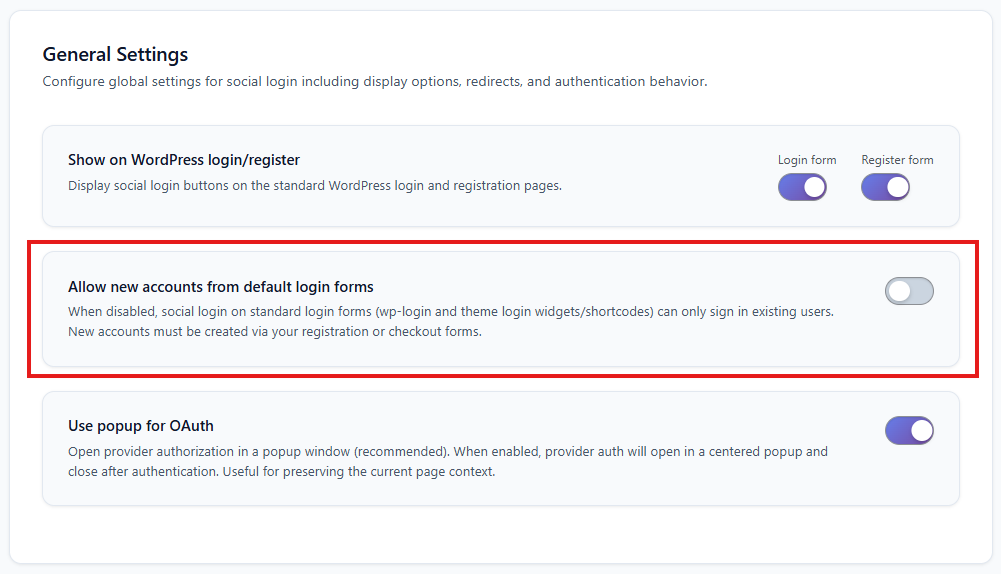
Screenshot: General Settings - "Allow new accounts from default login forms" toggle
What it does:
- Social, Magic Link, and Email OTP can log in existing users
- And they can create new accounts from core login screens
- wp-login.php + VC login widgets become existing users only
- Social, Magic Link, and Email OTP: ✅ Log in existing accounts, ❌ Never create new accounts on those core login forms
- New users must register via: Registration page, WooCommerce checkout, or Course / membership enrollment flows
Result: Your WordPress user table stays lean. Core login screens are no longer a passive "create account here" surface.
2. WooCommerce: Protect Login Page, Not Checkout
If you’ve ever dealt with WooCommerce social login spam from the My Account page, you already know how bad it gets when every click on “Login with X” creates a brand-new customer record.
For stores, the rules must be different:
- My Account login - for returning customers
- Checkout - where you actually want new customers created
VentraConnect's WooCommerce guardrail (Pro) is built around that split.
"Allow new account creation from WooCommerce login page"
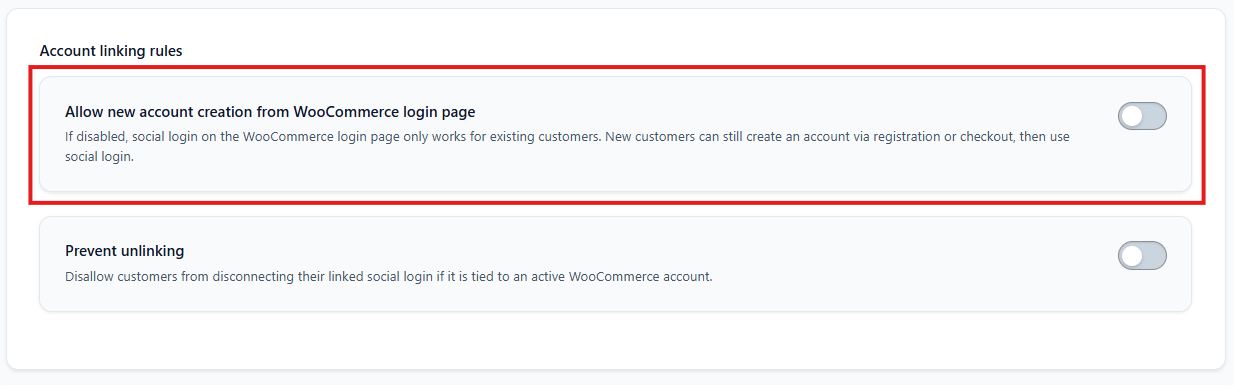
WooCommerce settings section with account linking rules
What it controls:
- My Account login page only (/my-account/ when used as a login screen)
- Applies to: Social login, Magic Link, Email OTP
- What it does not touch: Checkout registration, Dedicated WooCommerce registration forms
Behaviour
My Account login can:
- Log in existing customers
- Create new customers when someone uses social / Magic / OTP with a new email
- My Account login becomes "existing customers only"
- Social, Magic Link, and Email OTP: ✅ Log in existing WooCommerce customers, ❌ Do not create new customers on My Account login
- Checkout: Still creates accounts normally
- Users can then use social/passwordless next time they log in
FAQ tie-in: do guardrails hurt checkout conversion?
No. Guardrails for WooCommerce are focused on the My Account login page, not checkout. Checkout registration remains separate and continues to create customer accounts normally. In practice, preventing junk "drive-by" accounts on the My Account login screen keeps your customer table cleaner, helps performance on larger stores, and reduces confusion in CRM / analytics.
3. LMS and Course Platform Protection
On an LMS, you generally want:
- Students to become users when they enroll or purchase a course
- Not when they randomly click a login button on a generic login page
Otherwise you end up with LMS spam accounts created by anyone who happens to see a social or passwordless button on the login screen.
VentraConnect Pro adds LMS guardrails for:
- LearnDash
- LearnPress
- LifterLMS
Each integration has an "Allow auto-create on login" style toggle that now applies to: Social login, Magic Link, Email OTP
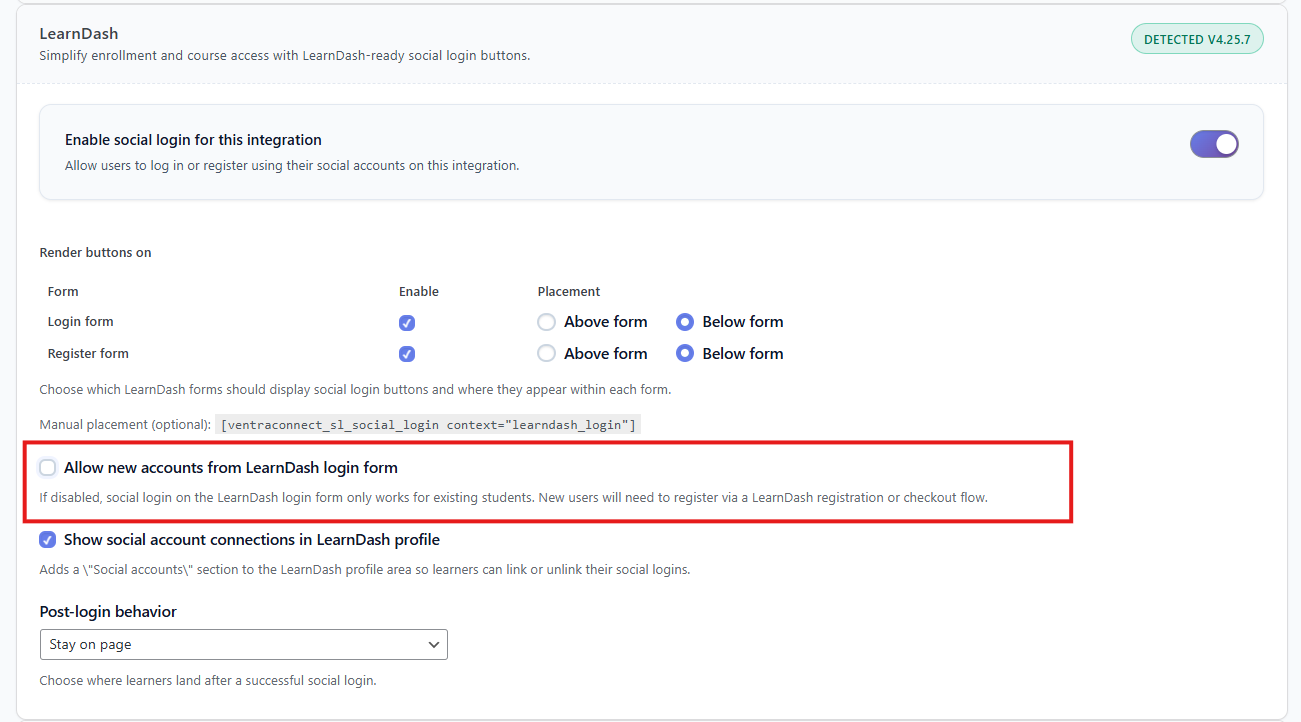
LearnDash, LearnPress, and LifterLMS toggles
LMS guardrail behaviour
For each LMS login form, you can choose:
Login forms can:
- Log in existing students via social/passwordless
- Create new student accounts when a new email logs in via social/passwordless
Useful if you want a more open "login == sign up" behaviour.
- LMS login forms become "existing students only"
- Social, Magic Link, and Email OTP: ✅ Log in existing students, ❌ Cannot create new student accounts from the login screen
- Course purchase / enrollment flows: Continue to create student accounts normally
This keeps your student rosters clean and accurate, and ensures people become students by going through your actual purchase / enrollment funnel.
4. Communities and Membership Sites
Membership and community sites suffer hard if anyone can "log in with X" and automatically become a member.
That’s how membership site spam signups slip in: every social login click becomes a new member record, even if the person never goes through your real registration or payment flow.
VentraConnect Pro gives you guardrails for:
- MemberPress
- BuddyPress
Each has an "Allow auto-create on login" type control for its login contexts.
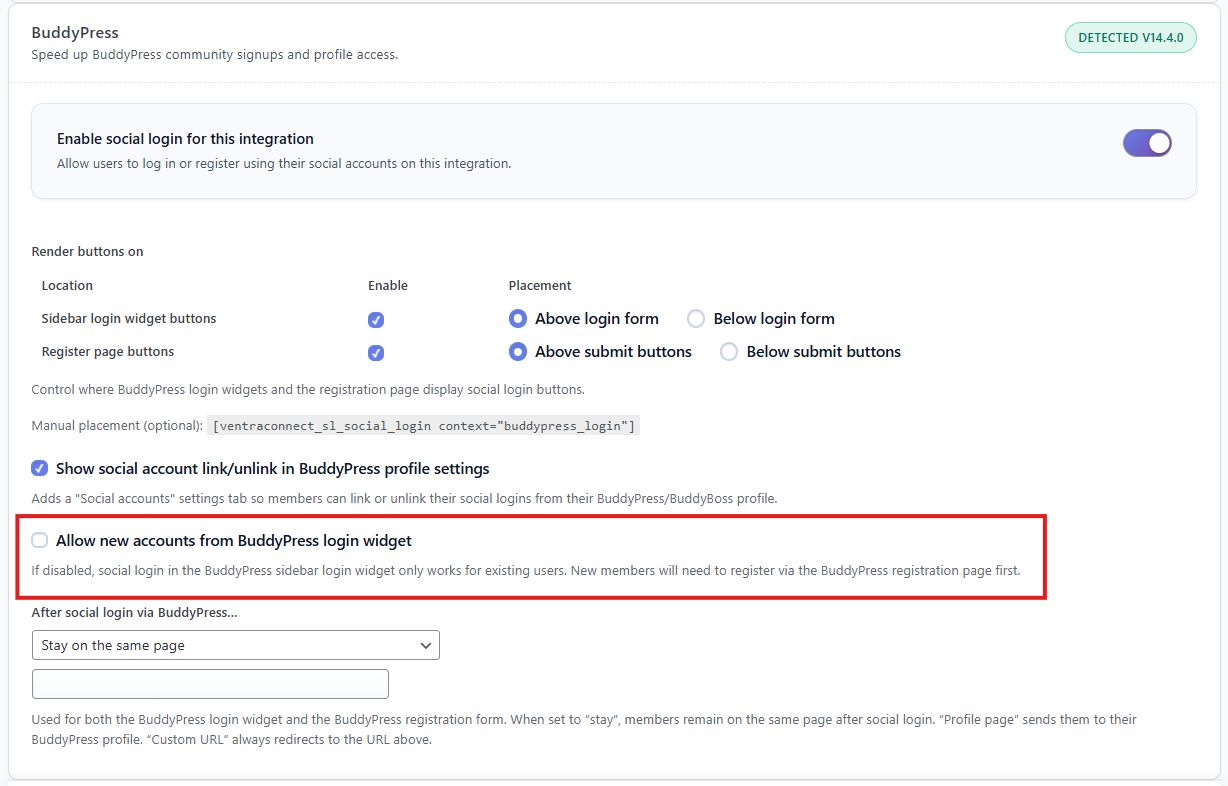
MemberPress and BuddyPress settings
Membership guardrail behaviour
Login forms/widgets can:
- Log in existing members via social/passwordless
- Create new members if a new email logs in
- Login forms/widgets become "existing members only"
- Social, Magic Link, and Email OTP: ✅ Log in existing members, ❌ Refuse to create new member accounts from login
- New members are forced through: Membership registration pages, Payment flows, Any onboarding you've set up
Note: There are also integrations for platforms like Paid Memberships Pro and Ultimate Member. Their login and registration flows work with VentraConnect social/passwordless, and deeper "existing users only" toggles for those are on the roadmap.
5. Magic Link and Email OTP Registration Modes
Guardrails control where accounts can be created. Registration modes for passwordless control whether Magic Link and OTP are allowed to create accounts at all.
Without those rules, Magic Link and Email OTP can also turn into a source of Magic Link spam and OTP-based fake signups. The goal here is passwordless login security for WordPress, not just another way for bots and random visitors to auto-create accounts from your login pages.
Two global modes per method: login_and_register or login_only
VentraConnect Social Login → Login Methods → OTP
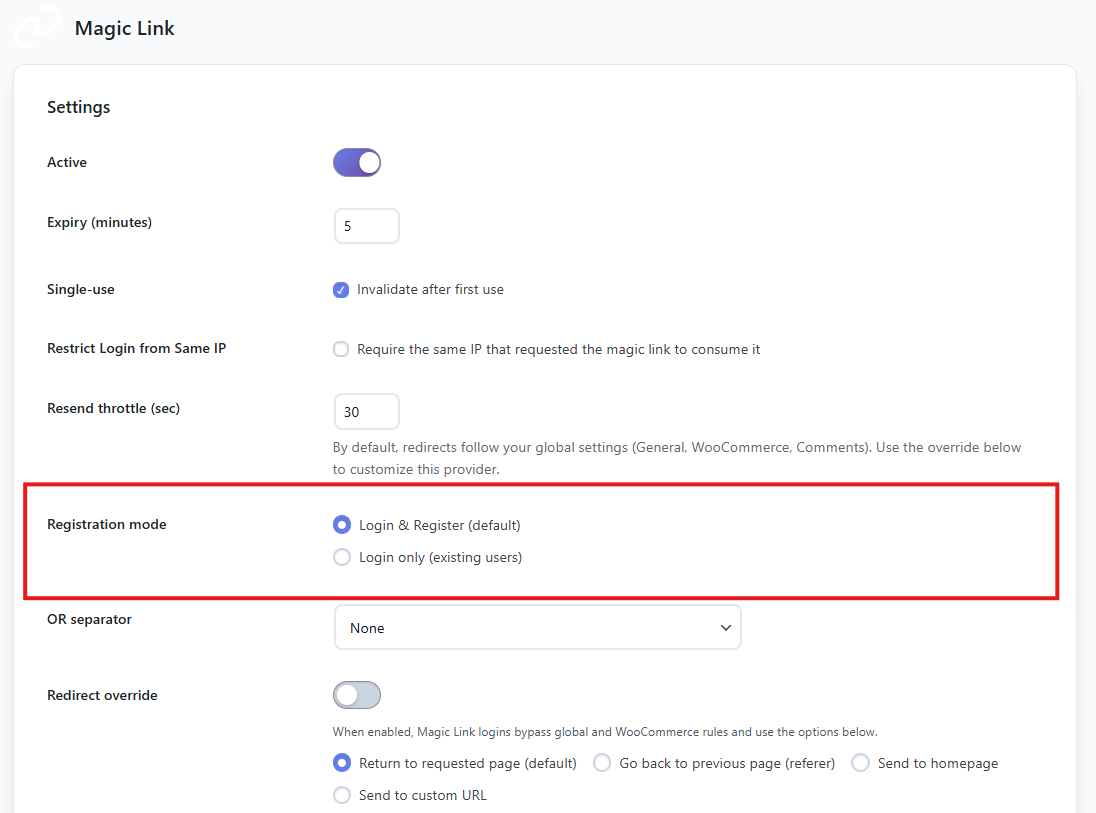
Magic Link and OTP Email registration mode settings
login_and_register (default)
For Magic Link or Email OTP:
- They can create new accounts only where guardrails say "yes"
- If guardrails allow new accounts on a form: New email + Magic/OTP → account created
- If guardrails block new accounts on a form: New email + Magic/OTP → blocked, friendly error
login_only (strict mode)
For Magic Link or Email OTP:
- They never create accounts anywhere
- Email must already exist in WordPress
- Guardrails still apply, but for creation it's simple: always no
Typical pattern:
- Guardrails: decide where any method (social, Magic Link, OTP) is allowed to create new accounts.
- Magic Link & Email OTP: keep them in
login_and_registerif you want them to be able to create users on specific registration / checkout / enrollment flows, or switch tologin_onlyif you want them to never create accounts anywhere.
Either way, guardrails make sure login-only screens don't silently turn into new-user factories.
6. Real-World WordPress Setup Examples
Blog is public for SEO, but only real customers land in your Users table.
Config:
- Allow new accounts from default login forms: OFF (no new accounts from wp-login.php / widgets)
- Allow new account creation from WooCommerce login page: OFF (My Account = existing customers only)
- Checkout: standard Woo registration (accounts created there)
- New customers are created only via checkout or a dedicated registration page
- My Account and wp-login are login only
- Magic Link / OTP provide passwordless convenience to real customers wherever you enable them
- Customer database stays clean, performance stays sane
Only people who purchase/enroll become students.
Config:
- Allow new accounts from default login forms: OFF
- LearnDash "Allow auto-create on login": OFF (login = existing students only)
- Enrollment / checkout: standard LearnDash / Woo behaviour (creates users there)
- Magic Link / Email OTP: enabled wherever you want them – LearnDash login forms will still respect guardrails and not create new students directly.
- Students are created via purchase/enrollment flows only
- LearnDash login forms only log in existing students
- No random "social login = new student" spam
Controlled free signup flow, login forms strictly for existing members.
Config:
- Allow new accounts from default login forms: OFF
- MemberPress "Allow auto-create on login": OFF (login = existing members only)
- BuddyPress auto-create on login: OFF (login widget = existing members only)
- Registration: MemberPress registration pages / payment forms handle new members
- Magic Link / Email OTP: use them on member login screens as needed – guardrails ensure those logins don’t create new member accounts directly.
- Every member goes through a registration/payment funnel you control
- Login forms/widgets never auto-register strangers
- Social + passwordless are pure convenience for the people who belong there
7. Step-by-Step Setup Guide: Enable WordPress Account Guardrails
Use this as a checklist.
Step 1 - Protect core WordPress login
Go to VentraConnect → Settings → General Settings
Turn off "Allow new accounts from default login forms" if you want wp-login.php + VC widgets to be existing-users-only
Step 2 - Lock down WooCommerce My Account
Go to VentraConnect → WooCommerce
Turn off "Allow new account creation from WooCommerce login page"
Confirm that checkout still creates customers as usual
Step 3 - Lock down LMS login pages (Pro)
Go to VentraConnect → Courses & LMS
For each platform you use (LearnDash, LearnPress, LifterLMS): Decide if the login form should create new students
Turn off "Allow auto-create on login" to make them "existing students only"
Step 4 - Lock down membership login (Pro)
Go to VentraConnect → Community & Memberships
For MemberPress / BuddyPress login contexts: Turn off new account creation if you want registration to happen only via dedicated flows
Step 5 - Configure Magic Link & Email OTP modes (Pro)
VentraConnect Social Login → Login Methods → Magic Link
VentraConnect Social Login → Login Methods → OTP
For each method: Choose Login & Register if it should be allowed to create users where guardrails allow, or Choose Login only if it must never create accounts anywhere
Step 6 - Test on staging
Use a staging site or a copy of production. Test with: Existing user emails (should log in correctly), Brand-new email (should only create accounts where you intend)
Hit: wp-login.php, My Account login, Checkout, LMS login forms, Membership login forms
Ready to stop junk WordPress user registrations?
Install VentraConnect Social Login to get core guardrails for wp-login.php and default login forms (free). Upgrade to VentraConnect Pro for WooCommerce, LMS, membership guardrails and full passwordless control.
Download Free PluginFrequently Asked Questions About WordPress Account Guardrails
1. What happens when a new user tries to log in with social, Magic Link, or Email OTP and guardrails are enabled?
When guardrails are enabled on a login form, VentraConnect first checks: Does this email already exist as a WordPress user? Is this form allowed to create new accounts according to guardrail settings? For Magic Link / OTP, is the registration mode login_and_register or login_only? If the email is new and this form is not allowed to create accounts (or the method is in login_only mode), VentraConnect blocks account creation and shows a clear message telling the user to register via your checkout, registration, or enrollment flow. Existing users log in normally with social, Magic Link, or OTP. Only "drive-by" new emails on restricted login screens are blocked.
2. Do account guardrails affect WooCommerce checkout conversion rates?
No. WooCommerce guardrails in VentraConnect apply to the My Account login page, not checkout. Checkout registration is separate and continues to create customer accounts normally. In practice, what guardrails do is prevent My Account from silently auto-registering random visitors, keep your customer list cleaner and smaller, and help performance on large stores. So you get the conversion benefits of social/passwordless at checkout, without turning your login screen into a new-user factory.
3. Can I use different guardrail settings for different social providers?
Right now, guardrails are applied per form or context (core login, Woo login, LMS login, membership login) and per authentication method (social vs Magic Link vs Email OTP, via their registration mode). You can't yet say "Facebook can register here but Google can't" on the same screen. If you need that level of control today, it requires custom development on top of VentraConnect; per-provider options in the UI are on the roadmap.
4. Will guardrails block legitimate users from accessing my site?
If you configure them sensibly, no. Guardrails don't touch checkout registration, LMS enrollment flows, or membership registration flows. Those are still where new accounts are created. Guardrails simply stop login screens from behaving like hidden registration endpoints. Existing users experience normal social login, normal Magic Link login, and normal Email OTP login. New users just get pushed through the flows where you actually want to onboard them.
5. Are account guardrails available in the free version of VentraConnect?
The core guardrail is free: Control whether new accounts can be created from wp-login.php and VentraConnect login shortcodes / theme widgets. VentraConnect Pro unlocks: WooCommerce My Account guardrail, LMS guardrails (LearnDash, LearnPress, LifterLMS), Membership/community guardrails (MemberPress, BuddyPress), Magic Link + Email OTP passwordless modes, Advanced analytics and priority support. So you can start cleaning up wp-login.php for free, and upgrade to Pro when you need full control across store, LMS, and membership platforms.
6. How do guardrails improve WordPress security and performance?
By cutting off unwanted registration paths, guardrails reduce the number of low-quality / spam accounts that get created, shrink your wp_users and wp_usermeta tables over time, make it harder for bots to create disposable accounts via social login on generic login screens, and keep audit logs, LMS rosters, customer lists and member lists much cleaner. Less junk data means faster queries, cleaner admin screens, easier reporting and segmentation, and fewer weak points for attackers to exploit. Combine that with passwordless methods (Magic Link, Email OTP) and you get a modern, low-friction, higher-integrity authentication setup.
Why VentraConnect Guardrails Are Different from Other WordPress Social Login Plugins
Most social login plugins follow the same pattern:
"If email is new, register a user wherever this button lives."
That's fine on a registration form. It's a problem on:
- wp-login.php
- Woo "My Account" login
- LMS login forms
- Membership login widgets
VentraConnect's guardrails model is simple:
- Login forms: authenticate existing users, and give you per-form account control so you can limit social login to existing users only on the screens you choose.
- Registration / checkout / enrollment: are the places where new accounts are created on purpose, with the data and onboarding you actually need.
- All methods (social, Magic Link, OTP) follow the same guardrail rules so behaviour is consistent everywhere, instead of each method inventing its own registration logic.
You decide where new accounts are allowed, and VentraConnect makes sure every login method respects those boundaries.
You get:
Fast, frictionless login for real users. Clean, controlled user growth. Guardrails that actually match how stores, LMSs and communities are supposed to work in 2026.
1 thought on “Stop Social Login Spam in WordPress: Guardrails for WooCommerce, LMS & Membership (2026 Guide)”
Pingback: WooCommerce Social Login with Guardrails and Passwordless Login
Comments are closed.