
WooCommerce has separate login, registration, checkout and My Account flows. VentraConnect Pro gives each its own account-creation rule.
Pro WooCommerce integration requires VentraConnect Pro.
On the WooCommerce login form, new accounts are allowed by default. Turn off Allow new accounts from the WooCommerce login form (VentraConnect → WooCommerce) to keep that form for existing customers only.
Login and Checkout Are Not the Same Thing
A WooCommerce login form is often meant for existing customers. Checkout may legitimately create a customer account depending on your WooCommerce settings. VentraConnect keeps those rules separate instead of treating every Social Login, Magic Link or Email OTP option as a generic signup route.
WooCommerce Login / My Account
In VentraConnect → WooCommerce (Account linking rules card), Allow new accounts from the WooCommerce login form is on by default. It controls whether Social Login, Magic Link and Email OTP on the WooCommerce login form (on My Account and on the classic checkout’s “Returning customer?” login) may create new accounts.
The Account linking rules card in VentraConnect → WooCommerce. Here Allow new accounts from the WooCommerce login form is shown switched off (existing customers only); it is on by default.
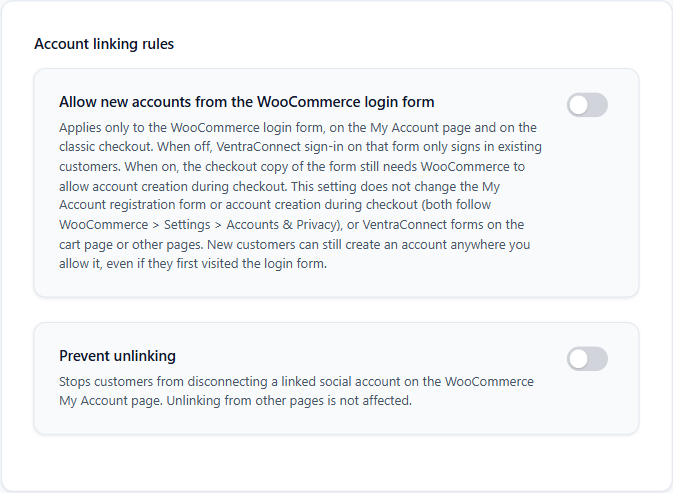
This setting does not change the My Account registration form or the checkout placements. The checkout copy of the login form additionally needs WooCommerce to allow account creation during checkout.
Typical use: turn the setting off so My Account is for existing customers, and let new customers enter through checkout or the registration form.
Which Setting Decides on Each Surface
For Social Login, Magic Link and Email OTP:
| Surface | A new account is allowed when |
|---|---|
| My Account login form | Allow new accounts from the WooCommerce login form is on (default). |
| Classic checkout login form (“Returning customer?”) | WooCommerce Allow customers to create an account during checkout is on and the login-form setting is on. |
| Classic checkout placements | WooCommerce Allow customers to create an account during checkout is on. |
| My Account registration form | WooCommerce Allow customers to create an account on the “My account” page is on. |
| Magic Link / Email OTP set to Login only | Never create accounts, on any surface. |
| Social Login | Has no Login-only mode, so it follows the rules above on every surface. |
| Passkeys | Not governed by WooCommerce. See section 5. |
Classic checkout only. Checkout placements work only on the classic checkout (the [woocommerce_checkout] shortcode). The WooCommerce Checkout block is not supported. Sites upgraded from older versions may still have a Cart placement saved; it has no setting in 1.4.x and no WooCommerce rule.
For the full decision table see WooCommerce Account Creation & Guardrails.
Checkout Can Remain an Intentional Account-Creation Flow
VentraConnect does not globally block new WooCommerce customer creation at checkout. It follows WooCommerce’s own setting (WooCommerce → Settings → Accounts & Privacy):
Test your exact WooCommerce settings. Turning off the login-form setting keeps My Account existing-customer-only, but checkout can still create accounts when WooCommerce allows it.
Magic Link, Email OTP and Passkeys
Magic Link and Email OTP keep their own registration mode inside WooCommerce flows:
A Clean WooCommerce Setup
Placement Does Not Decide Account Eligibility
Choosing whether VentraConnect appears above or below a WooCommerce form is a presentation decision. Account creation is decided by the settings in the table in section 3 and by the method’s registration mode.


